
Quantum Nature of Light with Young’s Double-Slit Experiment
Wave-Particle Duality Experiments
This guide outlines the steps to perform virtual experiments comparing Classical Particles, Classical Waves, and Quantum Objects.
1. Double Slit – Classical Particles (Sand)
Objective
To observe how particles such as sand pass through two slits and form a distribution pattern on the screen.
Steps
- Begin the Experiment: Select "Experiment 1: Classical Particles – Sand".
- Observe the Setup:
- A sand container at the top.
- Two slits (Slit 1 and Slit 2).
- A screen at the bottom.
- Action: Click Start Sand Flow.
- Observation: Sand begins to fall through both slits.
- Watch: Observe how the sand accumulates on the screen.
- Analyze: Click Show Graph to view the Intensity Distribution Graph.
- You will see two hump-shaped distributions.
- There are no interference fringes because sand behaves like classical particles.
- Controls:
- Click Stop Sand Flow to end.
- Click Reset Simulation to run again.
Expected Observation: The screen shows two independent piles of sand, representing classical particle behavior — No Wave Interference.
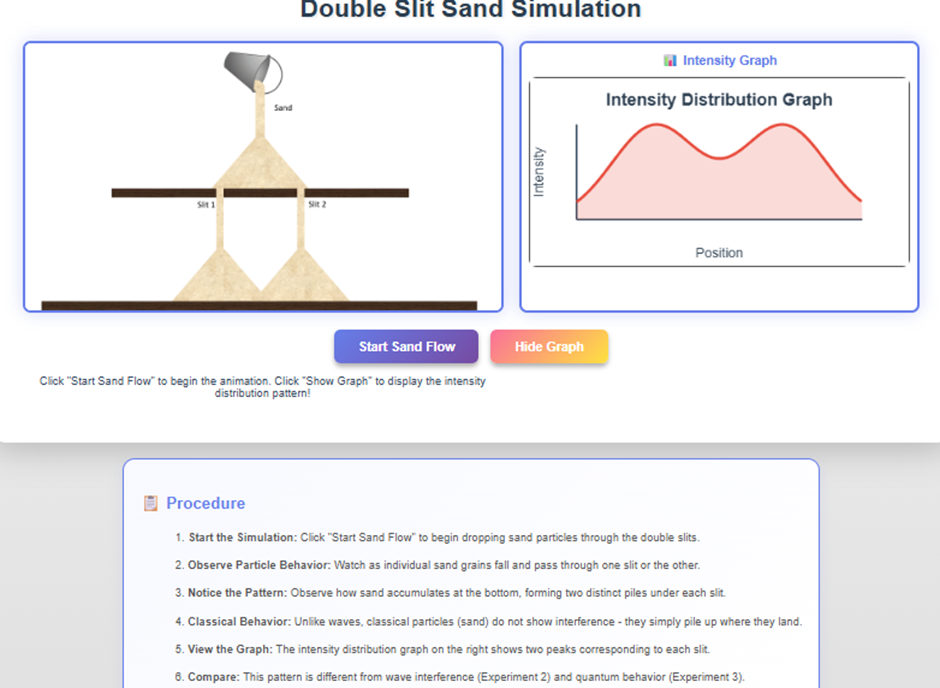
Fig 1. Intensity distribution graph for Classical Particle (Sand)
2. Double Slit – Classical Waves (Water)
Objective
To observe interference patterns produced by water waves passing through two slits.
Steps
- Begin the Experiment: Select "Experiment 2: Classical Wave – Water".
- Observe the Setup:
- A wave source (needle).
- A barrier with two slits.
- A screen.
- Action: Click Start to generate circular water waves.
- Watch: Waves reach the barrier and pass through the slits. Observe the overlapping wavefronts—this creates interference.
- Adjust Parameters (Optional):
- Wave Frequency
- Wave Amplitude
- Slit Separation
- Slit Width
- Analyze: Click Show Intensity Graph to display the interference pattern.
- Observation: Alternating bright and dark fringes with a symmetric pattern are observed as shown in fig.2.
- Controls: Click Stop to pause or Reset to start over.
Expected Observation: A clear interference pattern appears, proving that water behaves as a Classical Wave.
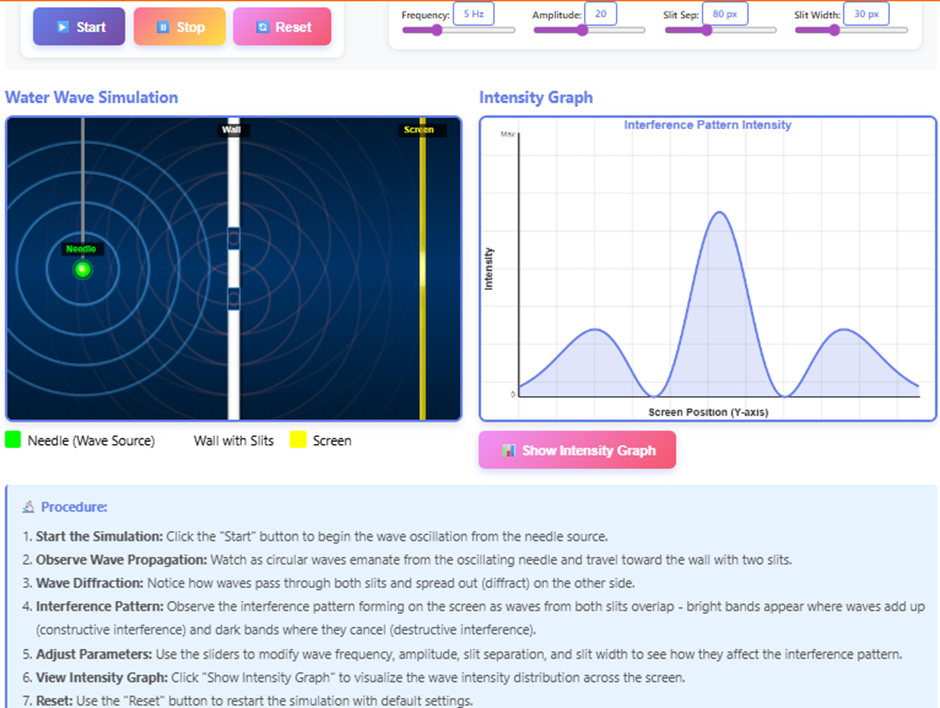
Fig 2. Intensity distribution graph for Classical Wave (Water)
3. Experiment: Quantum Object – Electron or Photon
Objective
To observe interference produced by quantum particles even when fired one at a time.
Steps
- Begin the Experiment: Select "Experiment 3: Quantum Object – Electron or Photon".
- Observe the Setup: You will see a black screen where particle hits will appear.
- Configure:
- Particle Count: Choose the number of particles using the "Electrons" dropdown.
- Adjust Parameters: Change Slit Separation d or Screen Distance D if available.
- Action: Click the Play button to start releasing electrons/photons.
- Watch:
- Observe individual dots appearing randomly.
- As more particles accumulate, a wave-like interference pattern emerges.
- Controls: Use Pause, Step-forward, or Restart for detailed observation.
Expected Observation: Even though particles hit the screen one by one, the accumulated pattern shows interference-like fringes. Evidence of Wave–Particle Duality.
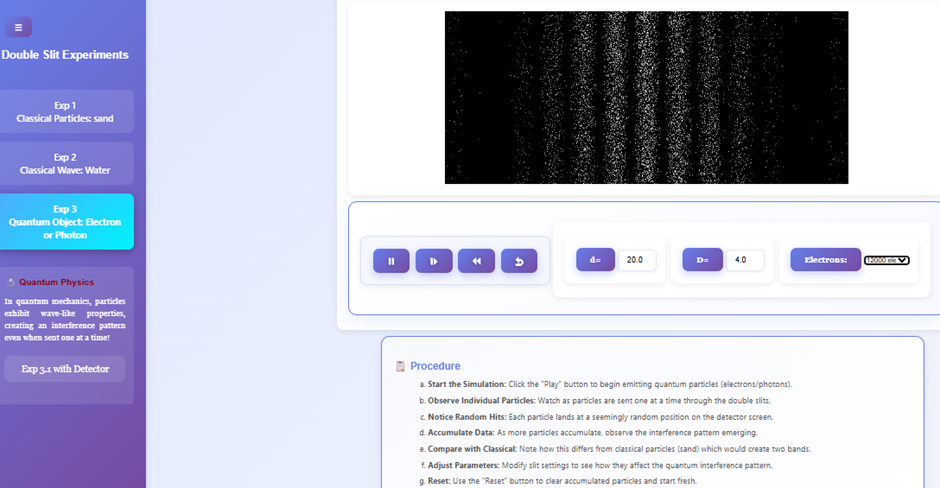
Fig 3. Interference Pattern by Quantum Particles (Electrons)
3.1 Quantum Object with Detector (Which-Slit Detection)
Objective
To study the effect of observation on quantum interference (The Observer Effect).
Steps
- Begin the Experiment: Select "Quantum Particle with Detector".
- Observe the Setup: Detectors are now placed at the slits to track which slit each particle passes through.
- Configure:
- Choose the number of particles.
- Adjust other parameters (if needed).
- Action: Click Play to begin sending electrons/photons.
- Watch:
- Because the detector identifies the slit, no interference fringe builds up.
- Only two bright particle clusters appear on the screen.
- Analyze: After sufficient particles, observe that the final pattern resembles the "Sand" experiment.
Expected Observation: When the particle is observed, the interference disappears. This proves the Observer Effect — measurement collapses the wave function and exhibits classical behaviour.
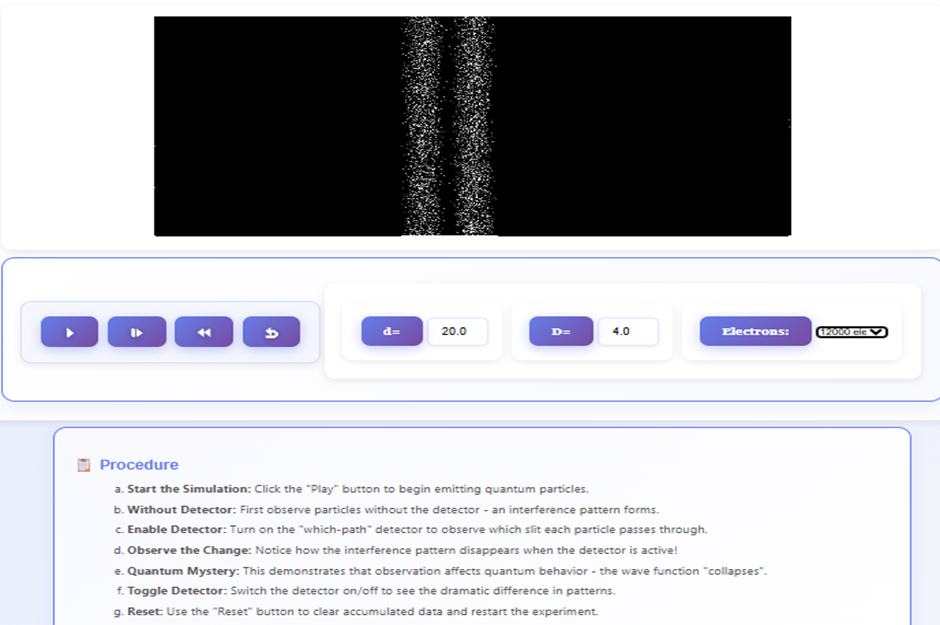
Fig 4. Final Pattern of Quantum Particles with Detector
Summary of All Experiments
| Experiment | System Type | Expected Pattern | Key Concept |
|---|---|---|---|
| Sand | Classical Particles | Two piles | No interference |
| Water Waves | Classical Waves | Interference fringes | Wave nature |
| Quantum (No Detector) | Electrons/Photons | Interference | Wave–particle duality |
| Quantum With Detector | Electrons + Measurement | Two piles (No interference) | Observer effect |