
Divide and Conquer Strategies I: Sorting
Procedure
Open the Divide and Conquer Simulation experiment.
From the Algorithm dropdown menu, select the sorting algorithm to be analyzed:
- Merge Sort
- Quick Sort(Median-of-Three)
Adjust the value of N (number of elements in the array) using the slider or input control provided.
Select the size of an array and the type of input to test different scenarios:
- Random Array: Generates a shuffled list of numbers.
- Already Sorted (Ascending): Tests best-case/specific scenarios.
- Already Sorted (Descending): Tests worst-case performance.
- Custom Input: Allows you to enter your own numbers (comma-separated, max 20).
Click the Generate Array button to start analysing visualization.
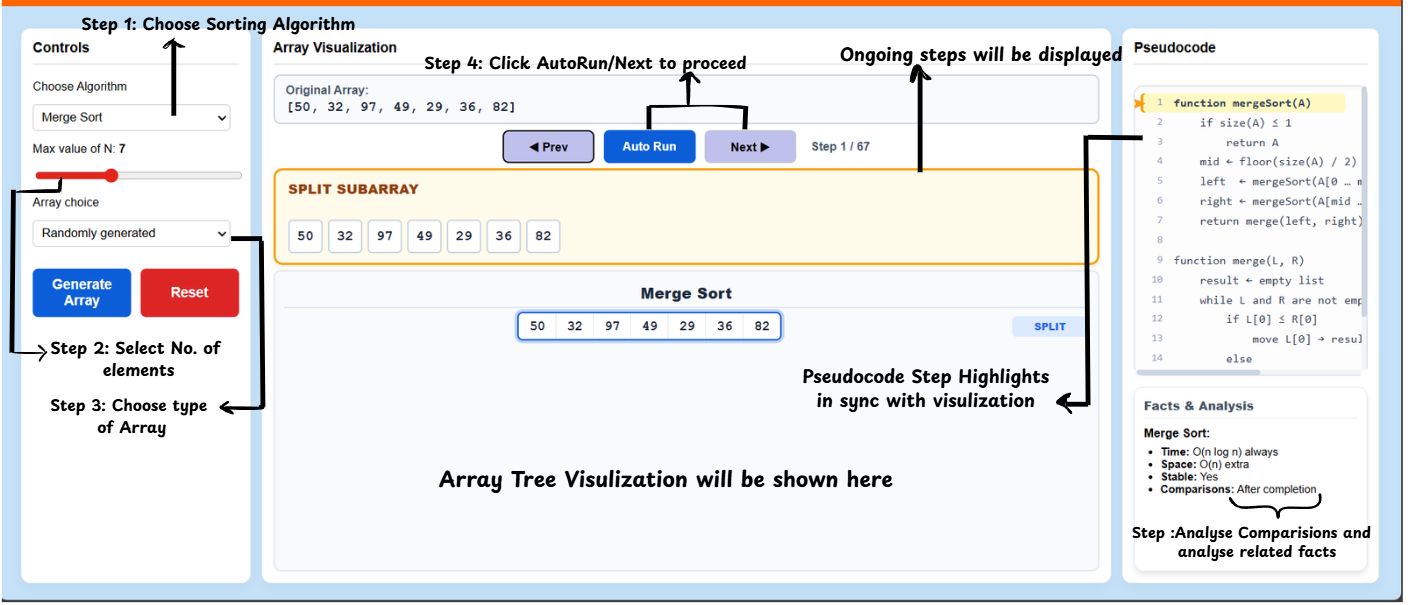
Simulation & Controls
Interactive Navigation:
- Use the Next button to step forward through the algorithm's decisions.
- Use the Prev button to go back and re-analyze a specific split or merge.
- Click Auto Run to watch the sorting process automatically. You can choose the speed (Slow, Normal, Fast).
Pseudocode Sync:
- As you step through, observe the Pseudocode panel on the right. The currently executing line(s) will be highlighted in yellow.
- The panel automatically scrolls to keep the active logic in view.
Visualisation Details
- The Middle Panel displays the current ongoing step and operation details (comparisons, pivots, swaps).
- Below the main screen controls, the Tree Visualisation shows the recursive divide-and-conquer steps in a diamond layout. Each level of recursion is mapped horizontally, with arrows indicating the flow of data during splitting and merging.
Result and Reset
- Facts & Analysis: The right panel displays real-time runtime metrics:
- Comparison Count: Updates dynamically as you step through.
- Complexity Theory: Displays average and worst-case time complexities as well as space requirements for the selected algorithm.
- Reset: Click the Reset button to clear the current simulation and repeat the experiment with a different configuration.