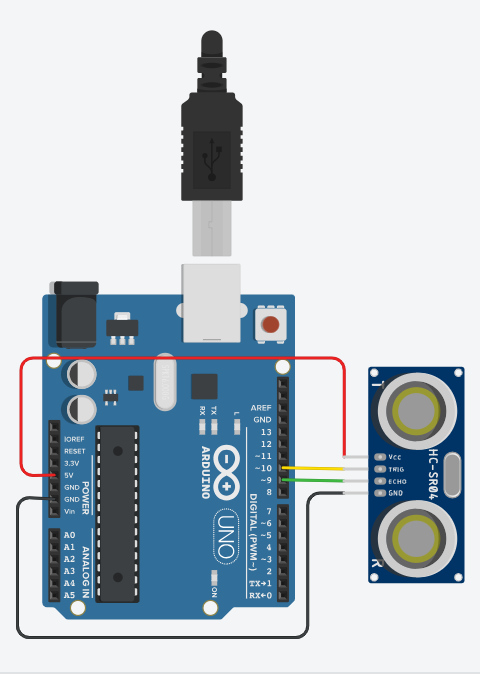
Interfacing Ultrasonic Sensor (HC-SR04) with Arduino:
Serial Monitor (COM3)
Waiting for simulation to start...
Instructions
Objective:
Learn how an ultrasonic sensor measures distance to objects using sound waves and displays readings on the Serial Monitor.
Steps to Perform:
- Click "Start Simulation" to power up the Arduino circuit
- Drag the red target object towards or away from the ultrasonic sensor
- Observe the distance measurement displayed on the canvas
- When the target is inside the detection zone (green cone), distance is shown
- When the target is outside the cone, "No Object Detected" message appears
- Check the Serial Monitor for continuous distance readings every second
Key Concepts:
- Ultrasonic Sensor (HC-SR04): Measures distance using sound waves (2-400cm range)
- Trigger Pin (Pin 10): Sends ultrasonic pulse (10μs HIGH signal)
- Echo Pin (Pin 9): Receives reflected pulse and measures time
- Distance Calculation: Distance = (Duration × Speed of Sound) / 2
- Serial Monitor: Displays real-time distance measurements in centimeters
- pulseIn(): Measures the duration of HIGH pulse on Echo pin
- Detection Zone: Cone-shaped area (±20°) where sensor can detect objects
Arduino Code - sketch_ultrasonic_sensor.ino