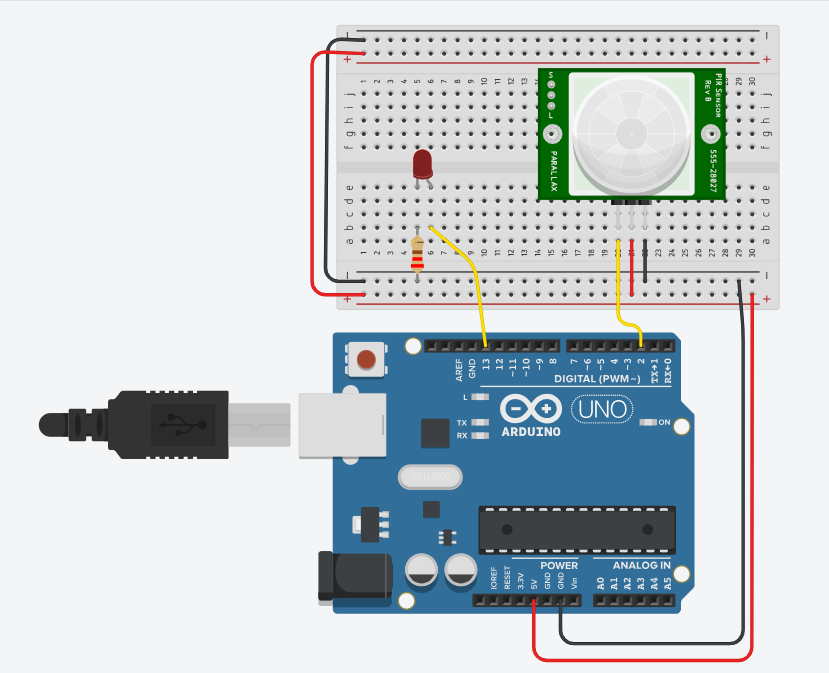
Interfacing PIR Motion Sensor with Arduino:
Drag Me
Serial Monitor (COM3)
Waiting for simulation to start...
Instructions
Objective:
Learn how a PIR motion sensor detects movement and triggers an LED output.
Steps to Perform:
- Click "Start Simulation" to power up the Arduino circuit
- Drag the person icon near the PIR sensor to trigger motion detection
- Observe how the LED turns ON when motion is detected
- Drag the person away to stop the motion
- Watch the LED turn OFF when motion ends
- Check the Serial Monitor for motion detection messages
Key Concepts:
- PIR Sensor: Detects infrared radiation changes from moving objects
- Detection Zone: Area where sensor can detect motion (shown in green)
- Digital Input: Sensor provides HIGH (motion) or LOW (no motion) signal
- Digital Output: Arduino controls LED based on sensor reading
- digitalRead(): Reads motion sensor state from digital pin 2
- digitalWrite(): Sets LED pin HIGH (ON) or LOW (OFF)
Arduino Code - sketch_pir_sensor.ino