Interfacing Stepper Motor with Arduino:
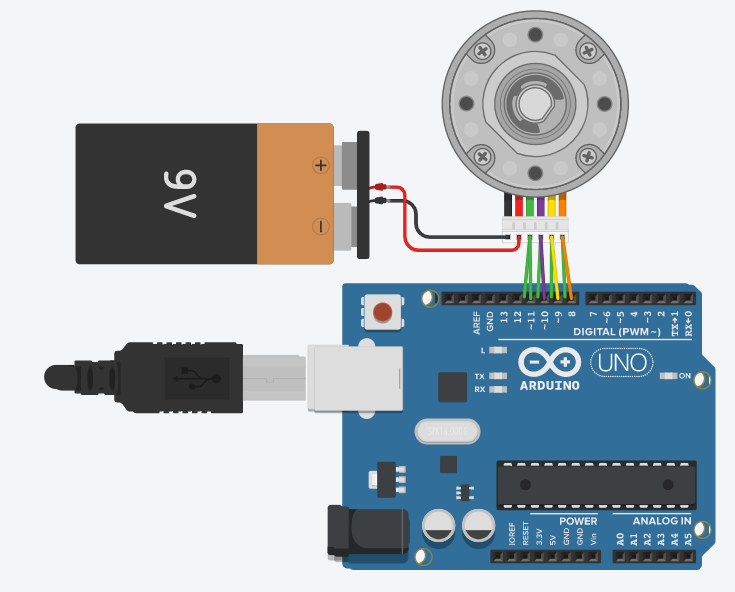
Instructions
Objective:
Understand the interfacing of a Stepper Motor with Arduino and learn to control its precision movement using the Stepper library.
Steps to Perform:
- Observe the Live Code Editor on the right. Modify the values of
stepsandspeed. - Set steps = 2048 to achieve a full 360° rotation, or 1024 for a half-turn.
- Set speed = 15 (standard RPM for geared stepper motors).
- Click "Start Simulation" to deploy the code to the virtual Arduino.
- Watch the motor's rotor and the pulsing electromagnetic coils in the visualization.
- Click "Stop Simulation" to halt the motor and reset the Arduino to an idle state.
Key Concepts:
- Step Resolution: This motor requires 2048 steps for one full 360° circle (approx. 0.176° per step).
- RPM (Speed): Rotations Per Minute. High-resolution geared motors typically run optimally between 10-20 RPM.
- Phase Sequencing: Arduino pins 8, 9, 10, and 11 pulse in a specific order to rotate the internal magnetic rotor.
- Stepper Library: Arduino library for controlling stepper motors
- Pin Configuration: Uses pins 8, 9, 10, 11 for motor driver control
- setSpeed(): Sets rotation speed in RPM
- step(): Moves motor by specified number of steps (positive = clockwise)