Instructions
- Click on the components to start interacting it with in the connection area
- Hover over the raspberry Pi connections to get informations about various connections pin
Software Installation
- Update the Raspberry Pi: Before installing any software, it is always recommended to update the Raspberry Pi's software packages to ensure that you have the latest security updates and bug fixes. Open a terminal window and type the following commands:
- Choose the software you want to install: There are thousands of software packages available for the Raspberry Pi, including web servers, media centers, development tools, and more. You can browse the available packages using the Raspberry Pi's package manager by typing:
- Configure the software: Depending on the software you installed, you may need to configure it before you can use it. Consult the software's documentation for instructions on how to do this
- Verify the installation: Once you have installed and configured the software, you can verify that it is working properly by testing it.
sudo apt-get update
sudo apt-get upgrade
sudo apt-cache search keyword
Replace "package-name" with the name of the software package you want to install.
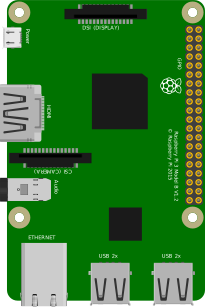 Raspberry Pi
Hover over a component to see its description.
CONNECTOR INFO