Interfacing RGB LED with Arduino:
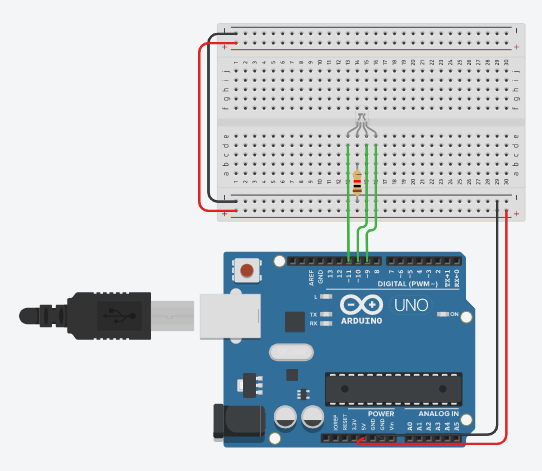
Instructions
Objective:
Learn how to control an RGB LED to display different colors using Arduino PWM (Pulse Width Modulation) outputs.
Steps to Perform:
- Click "Start Simulation" to power up the Arduino circuit
- The RGB LED will automatically cycle through 8 different colors
- Each color displays for 1 second before changing
- Color sequence: Red → Green → Blue → Raspberry → Cyan → Magenta → Yellow → White
- The color cycle repeats continuously
Key Concepts:
- RGB LED: LED with Red, Green, and Blue elements that mix to create colors
- PWM Control: Uses analogWrite() to control LED brightness (0-255)
- Pin Configuration: Red on pin 11, Green on pin 10, Blue on pin 9
- Color Mixing: Combine different intensities of R, G, B to create any color
- RGB_color() Function: Custom function sets color by controlling all three pins
- Primary Colors: Red (255,0,0), Green (0,255,0), Blue (0,0,255)
- Secondary Colors: Cyan (0,255,255), Magenta (255,0,255), Yellow (255,255,0)
Arduino Code - main.ino