Interfacing LCD Display with Arduino:
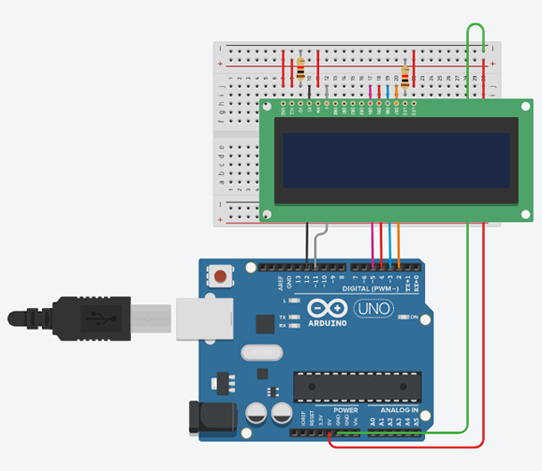
Instructions
Objective:
Learn how to interface and display text messages on a 16x2 LCD display using Arduino and the LiquidCrystal library.
Steps to Perform:
- Click "Start Simulation" to power up the Arduino circuit
- The LCD display will initialize and show "Virtual Lab" on the first line
- Messages will automatically scroll on the second line every 2 seconds
- Four different messages will be displayed in sequence
- The sequence will loop continuously until you stop the simulation
Key Concepts:
- LCD 16x2: Display module with 16 columns and 2 rows for text
- LiquidCrystal Library: Arduino library for easy LCD control
- Pin Configuration: Uses pins 2-5, 11, 12 for LCD communication
- lcd.begin(): Initializes LCD with specified dimensions (16, 2)
- lcd.setCursor(): Sets cursor position (column, row) for text display
- lcd.print(): Displays text at current cursor position
- lcd.clear(): Clears all text from the display
Arduino Code - main.ino