Interfacing 7-Segment Display with Arduino:
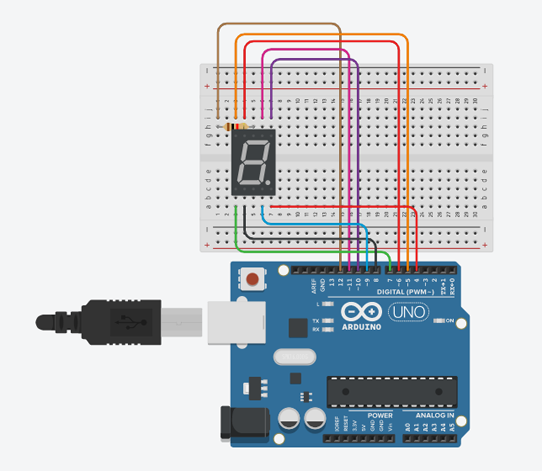
Instructions
Objective:
Learn how to control a 7-segment display to show digits (0-9) using Arduino digital outputs.
Steps to Perform:
- Click "Start Simulation" to power up the Arduino circuit
- The 7-segment display will automatically start counting from 0 to 9
- Observe how different segments light up to form each digit
- Watch the decimal point blink after each number
- The counter will loop back to 0 after reaching 9
Key Concepts:
- 7-Segment Display: LED display with 7 segments (A-G) plus decimal point
- Common Cathode: All segment cathodes connected together to ground
- Digital Output: Arduino controls each segment individually (HIGH/LOW)
- Segment Mapping: Different combinations create digits 0-9
- Pin Control: Uses pins 4-12 for segments and common cathode
Arduino Code - main.ino