Interfacing Push Button and Led with Arduino:
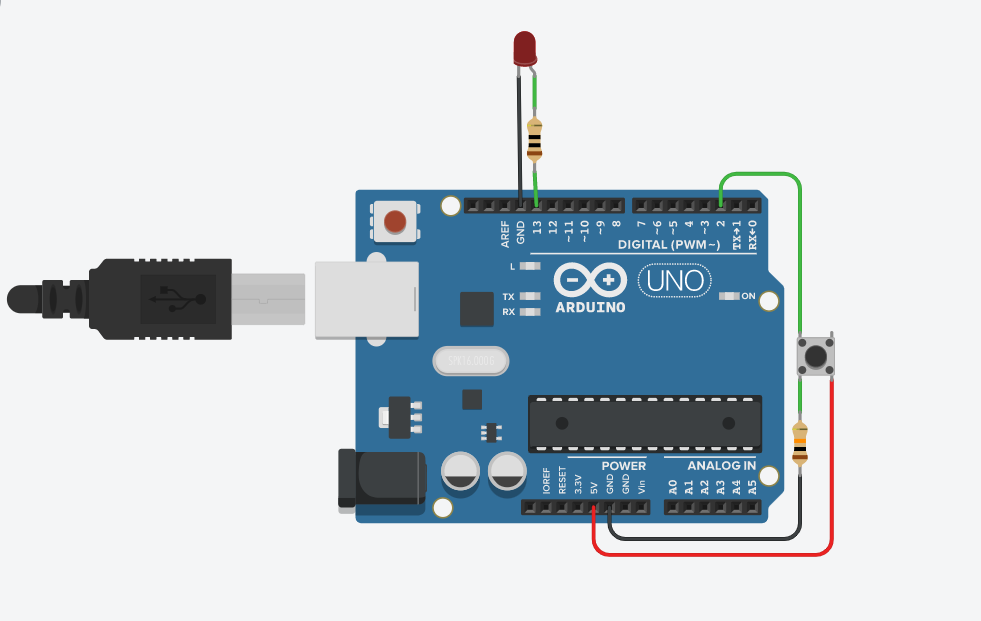
Instructions
Objective:
Learn how a push button works as a digital input to control an LED output.
Steps to Perform:
- Click "Start Simulation" to power up the Arduino circuit.
- Click on the push button to press it.
- Observe how the LED turns ON when button is pressed.
- Click the button again to release it.
- The LED will turn OFF when button is released.
Key Concepts:
- Digital Input: Button provides HIGH (pressed) or LOW (released) signal
- Pull-down Resistor: 10kΩ resistor keeps input LOW when button not pressed
- Digital Output: Arduino writes HIGH/LOW to LED pin to control it
- digitalRead(): Reads button state from digital pin 2
- digitalWrite(): Sets LED pin HIGH (ON) or LOW (OFF)
Arduino Code - main.ino