Interfacing Photoresistor and Led with Arduino:
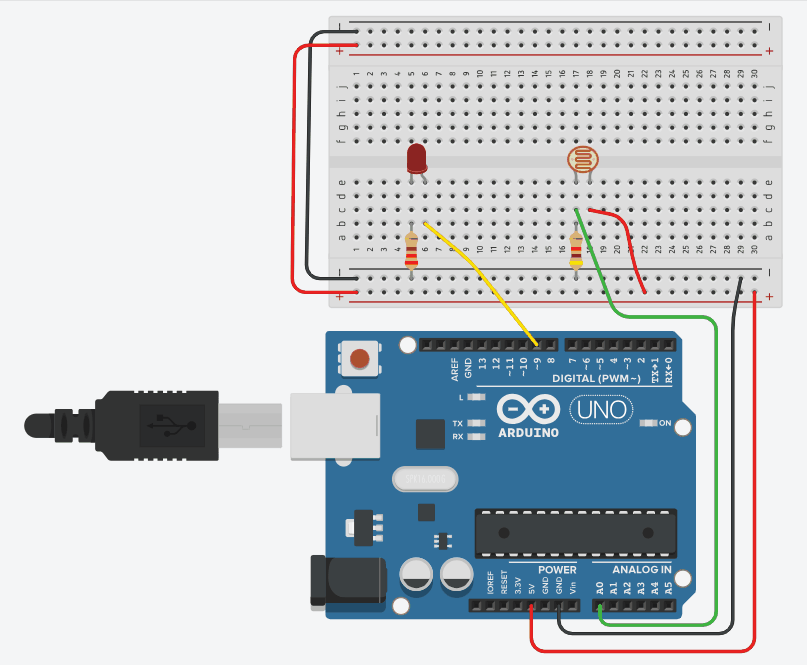
Sensor Value (LDR)
0
1023
LED Brightness
0
255
Instructions
Objective:
Learn how a photoresistor (LDR) detects light intensity and controls LED brightness automatically.
Steps to Perform:
- Click "Start Simulation" to power up the Arduino circuit.
- Click on the photoresistor (circular sensor) to activate it.
- Use the slider to simulate different light levels (0-100).
- Observe how the LED brightness changes based on light intensity.
- Higher light values → Brighter LED glow.
- Lower light values → Dimmer LED glow.
Key Concepts:
- LDR: Light Dependent Resistor - resistance decreases with more light
- Analog Read: Arduino reads voltage (0-1023) from the voltage divider
- PWM: Pulse Width Modulation controls LED brightness (0-255)
- Mapping: Converts sensor range (0-1023) to LED range (0-255)
Arduino Code - main.ino